/WRITING · SECURITY
Stale balances and leaked secrets: client-state rules for financial UIs
When Binance paused withdrawals after the October 2026 hack, every crypto UI had to tell the truth fast. Here are the rules I use for freshness, server-driven kill switches and persistence in React apps that show money, with TanStack Query and Zustand.
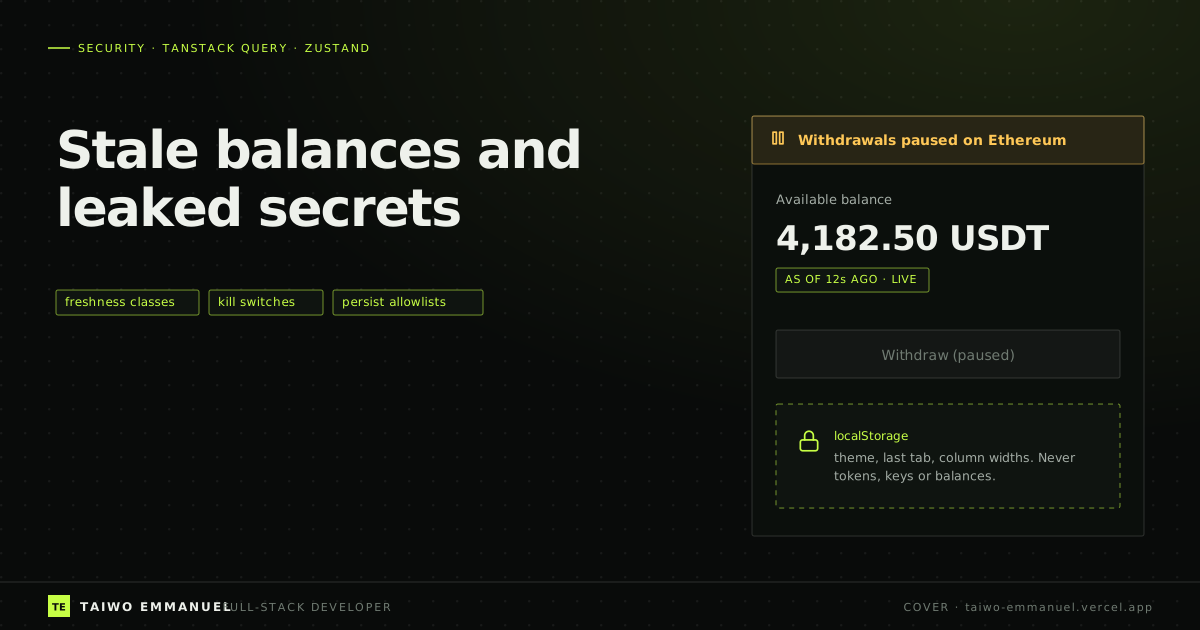
In the days after the October 2026 Binance hack, the exchange suspended deposits and withdrawals, then reopened withdrawals on 15 networks on 1 November, and customers moved billions of dollars out within hours. Every wallet, portfolio tracker and exchange frontend in the market had to answer two questions at once: is the number on screen still true, and is the button under it still safe to press?
Those questions do not only matter during a historic hack. They matter whenever a frontend shows money. And in my experience the answers are decided by a handful of client-state choices that teams make early and rarely revisit: a global staleTime, what gets persisted to localStorage, and whether the UI or the server decides that an action is available.
The problem: three quiet ways financial UIs lie
- Stale numbers that look live. A balance fetched four minutes ago, rendered in the same bold font as one fetched four seconds ago.
- Actions that outlive their availability. A withdraw button that stays enabled because the client never asked whether withdrawals are currently allowed on that network.
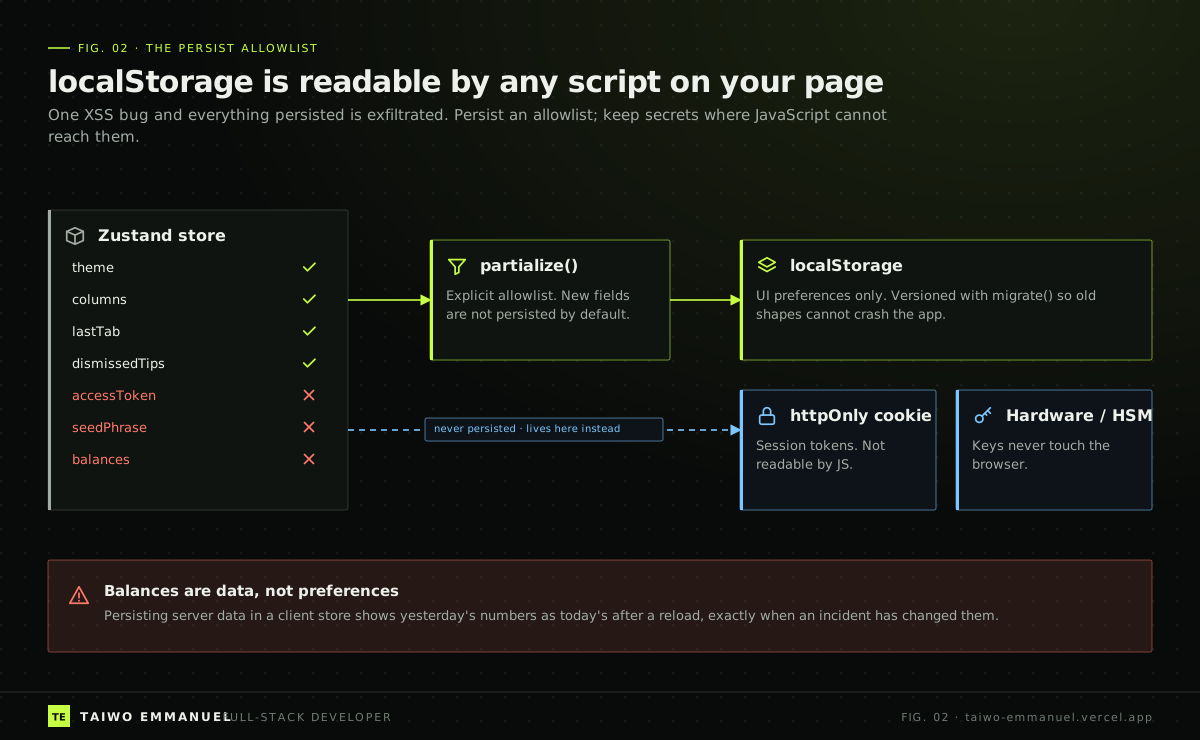
- Secrets in reach of scripts. Tokens or keys in a persisted client store, which any successful cross-site scripting bug can read in one line.
None of these is exotic. All of them get worse during incidents, which is precisely when users are most anxious and attackers most active.
The insight: classify data, let the server own availability, persist an allowlist
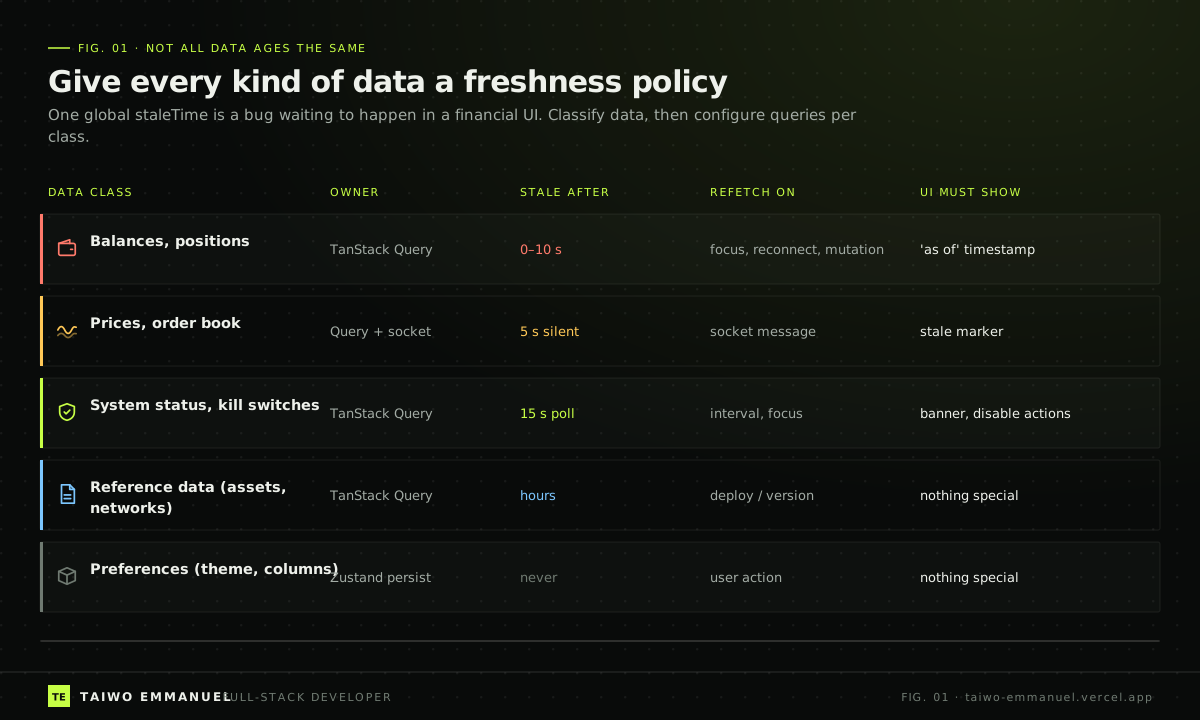
The fixes are three rules. First, every piece of server data belongs to a freshness class, and the class, not the component, decides staleTime, refetch triggers and what the UI must show. Second, whether an action is available is server state: kill switches and network status are queries that every money-moving control respects. Third, client persistence is an explicit allowlist of preferences, and secrets live where JavaScript cannot reach them at all.
Implementation walkthrough
Step 1: query options per freshness class
TanStack Query's queryOptions helper lets me define the policy once and reuse it everywhere, with type safety. Balances refetch on focus and reconnect and are considered stale almost immediately; reference data can sit for hours.
 TAIWO EMMANUEL / CODE NOTE
import { queryOptions } from "@tanstack/react-query";

const policies = {
  balance: { staleTime: 5_000, refetchOnWindowFocus: "always", refetchOnReconnect: "always", gcTime: 60_000 },
  status: { staleTime: 10_000, refetchInterval: 15_000, refetchIntervalInBackground: true },
  reference: { staleTime: 6 * 60 * 60 * 1000 },
} as const;

export type Balance = { asset: string; available: string; asOf: string };
export type NetworkStatus = { network: string; deposits: boolean; withdrawals: boolean; message?: string };

const getJson = async <T,>(url: string, signal: AbortSignal): Promise<T> => {
  const response = await fetch(url, { signal, credentials: "include" });
  if (!response.ok) throw new Error(`${url} failed with ${response.status}`);
  return response.json() as Promise<T>;
};

export const balancesQuery = () =>
  queryOptions({ queryKey: ["balances"], queryFn: ({ signal }) => getJson<Balance[]>("/api/balances", signal), ...policies.balance });

export const networkStatusQuery = () =>
  queryOptions({ queryKey: ["status", "networks"], queryFn: ({ signal }) => getJson<NetworkStatus[]>("/api/status/networks", signal), ...policies.status });

export const assetsQuery = () =>
  queryOptions({ queryKey: ["reference", "assets"], queryFn: ({ signal }) => getJson<string[]>("/api/assets", signal), ...policies.reference });
Step 2: show freshness instead of implying it
Every balance carries the server's asOf timestamp, and the UI says how old it is. When the query errors, the old value stays visible but is clearly labelled as possibly outdated, which is more honest than both a blank screen and a confident stale number.
TAIWO EMMANUEL / CODE NOTEimport { useQuery } from "@tanstack/react-query";
import { balancesQuery } from "./freshness";
const ago = (iso: string) => Math.max(0, Math.round((Date.now() - new Date(iso).getTime()) / 1000));
export function BalanceLine({ asset }: { asset: string }) {
const { data, isError, isFetching } = useQuery({
...balancesQuery(),
select: (balances) => balances.find((b) => b.asset === asset),
});
if (!data) return <p>Loading {asset} balance…</p>;
return (
<p>
<strong>{data.available} {asset}</strong>{" "}
<small aria-live="polite">
{isError ? "Could not refresh. Showing last known value." : `as of ${ago(data.asOf)}s ago`}
{isFetching ? " · refreshing" : ""}
</small>
</p>
);
}Step 3: kill switches come from the server, every time
The withdraw button asks the status query whether withdrawals are open on that network. If the status is unknown because the request failed, the button is disabled. Failing closed is the only safe default for money movement.
TAIWO EMMANUEL / CODE NOTEimport { useQuery } from "@tanstack/react-query";
import { networkStatusQuery } from "./freshness";
export function WithdrawButton({ network, onWithdraw }: { network: string; onWithdraw: () => void }) {
const status = useQuery({ ...networkStatusQuery(), select: (all) => all.find((s) => s.network === network) });
const open = status.isSuccess && status.data?.withdrawals === true;
const reason = status.isPending
? "Checking network status…"
: status.isError || !status.data
? "Status unavailable. Withdrawals are disabled until it can be confirmed."
: status.data.withdrawals
? null
: status.data.message ?? `Withdrawals are paused on ${network}.`;
return (
<div>
<button disabled={!open} onClick={onWithdraw}>Withdraw</button>
{reason ? <p role="status">{reason}</p> : null}
</div>
);
}
Step 4: persist an allowlist, version it, and clear everything on logout
Zustand's persist middleware will happily save the whole store if you let it. partialize turns that into an allowlist: new fields are not persisted unless someone deliberately adds them in review. A version number and migrate function stop an old saved shape from crashing a new release. On logout, both the query cache and the client store are wiped, so the next person on a shared device sees nothing.
TAIWO EMMANUEL / CODE NOTEimport { create } from "zustand";
import { persist, createJSONStorage } from "zustand/middleware";
import type { QueryClient } from "@tanstack/react-query";
type Preferences = {
theme: "dark" | "light";
hiddenColumns: string[];
lastTab: "overview" | "history";
setTheme: (theme: Preferences["theme"]) => void;
};
const defaults = { theme: "dark", hiddenColumns: [], lastTab: "overview" } as const;
export const usePreferences = create<Preferences>()(
persist(
(set) => ({ ...defaults, hiddenColumns: [], setTheme: (theme) => set({ theme }) }),
{
name: "prefs",
version: 2,
storage: createJSONStorage(() => localStorage),
// Allowlist: only these keys are ever written to storage.
partialize: (state) => ({ theme: state.theme, hiddenColumns: state.hiddenColumns, lastTab: state.lastTab }),
migrate: (persisted, version) => (version < 2 ? { ...defaults } : (persisted as Partial<Preferences>)),
},
),
);
export function logout(queryClient: QueryClient) {
queryClient.clear(); // drop every cached balance, order and status
usePreferences.persist.clearStorage();
usePreferences.setState({ ...defaults, hiddenColumns: [] });
// The session cookie is httpOnly; the server clears it in the logout response.
return fetch("/api/logout", { method: "POST", credentials: "include" });
}Takeaway
- Give each data class a freshness policy and configure it once with queryOptions. Show users how old a number is.
- Make availability server state. Money-moving controls read a status query and fail closed when it is unknown.
- Persist an explicit allowlist of preferences, version it, and never persist tokens, keys or server data.
- Clear the query cache and client stores on logout.
These are small decisions. During a calm week they are invisible. During a week like the one after 29 October 2026, they decide whether your interface is part of the panic or part of the reassurance.
References
- 1. Binance's $6.3 billion hack raises questions about crypto wallet safety — CNBC, 31 October 2026
- 2. 2026 Binance hack — Wikipedia, accessed 2 November 2026
- 3. Important defaults — TanStack Query docs
- 4. Query options — TanStack Query docs
- 5. Persisting store data — Zustand docs
- 6. HTML5 Security Cheat Sheet (local storage) — OWASP
- 7. Using HTTP cookies (HttpOnly) — MDN