/WRITING · AI ENGINEERING
Streaming an AI agent's work into React with TanStack Query
An AI agent run is not a request, it is a stream of typed events. Here is how I render tool calls, tokens and results live in React using TanStack Query's streamedQuery, with Zustand for the UI-only state.
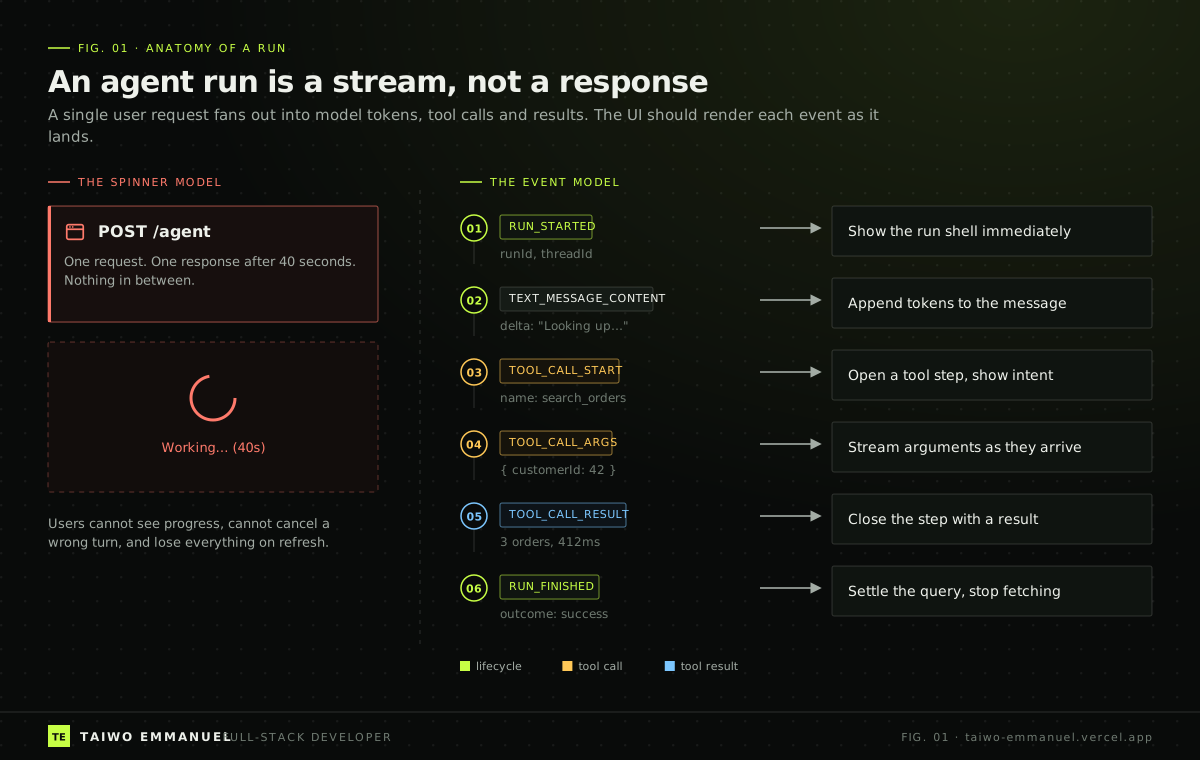
Every AI agent demo I have seen in the last year has the same weak spot. The model is impressive, the tools are clever, and then the user clicks Run and stares at a spinner for forty seconds. Somewhere on a server the agent is searching, reasoning, calling three APIs and drafting an answer. In the browser, nothing is happening.
That gap is not cosmetic. When people cannot see what an agent is doing, they cannot correct it, they cannot trust it, and they refresh the page, which throws the whole run away. In this post I want to show how I close that gap in React with TanStack Query, a little Zustand, and a mental model shift: an agent run is not a request. It is a stream of server state.
The problem: request/response thinking
Most agent frontends are built like a form submission. POST the prompt, await the JSON, render the answer. That model assumes the work is short and opaque. Agent work is neither. A single run can take a minute, branch through several tool calls, and fail halfway through for reasons the user could have prevented if they had seen it coming.
Protocols have already moved on. The AG-UI protocol, which frameworks like CopilotKit build on, describes an agent run as a sequence of standard events: the run starts, text arrives in deltas, a tool call starts, its arguments stream in, a result comes back, the run finishes or errors. MCP handles how the agent reaches tools; event protocols like AG-UI handle how the user sees the agent. The frontend's job is to turn that sequence into something a person can follow.
The insight: a run is server state that arrives in pieces
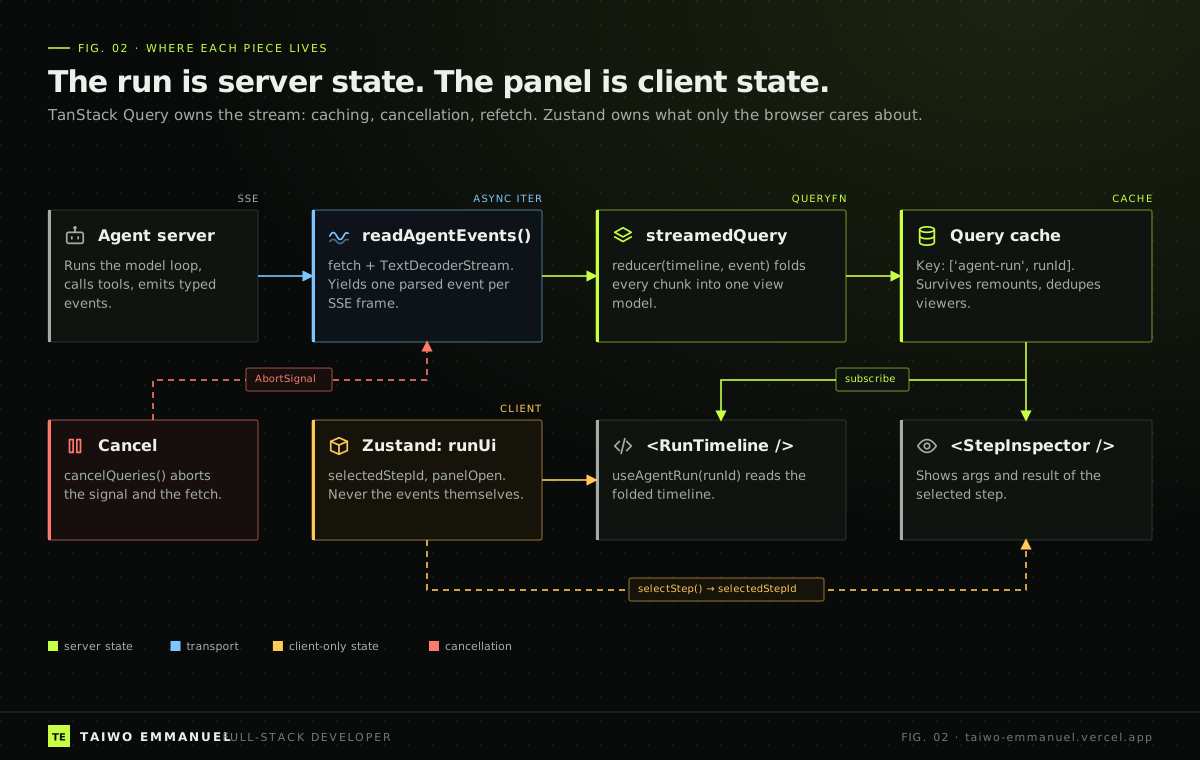
Once I stopped thinking of the run as a request, the architecture got simpler. The events come from the server. Their truth lives on the server. They can be cached, deduplicated across components, cancelled, and refetched. That is the exact job description of TanStack Query, and since v5 it has a helper for precisely this shape of data: experimental_streamedQuery, which turns any AsyncIterable into a query function. The query stays pending until the first chunk lands, then switches to success while fetchStatus stays fetching until the stream ends.
What does not belong in the query cache is everything that only exists because a human is looking at the screen: which step is expanded, whether the inspector panel is open. That is client state, and a tiny Zustand store is the right home for it.
Implementation walkthrough
Step 1: turn Server-Sent Events into an async iterable
The browser's EventSource only supports GET, and agent runs usually need a POST body. So I read the stream with fetch and parse frames myself. The function is an async generator, which is exactly the input streamedQuery wants, and it takes the AbortSignal that TanStack Query hands to every query function.
 TAIWO EMMANUEL / CODE NOTE
export type AgentEvent =
  | { type: "RUN_STARTED"; runId: string }
  | { type: "TEXT_MESSAGE_CONTENT"; messageId: string; delta: string }
  | { type: "TOOL_CALL_START"; toolCallId: string; name: string }
  | { type: "TOOL_CALL_ARGS"; toolCallId: string; delta: string }
  | { type: "TOOL_CALL_RESULT"; toolCallId: string; content: string; ms: number }
  | { type: "RUN_FINISHED" }
  | { type: "RUN_ERROR"; message: string };

export async function* readAgentEvents(runId: string, signal: AbortSignal): AsyncGenerator<AgentEvent> {
  const response = await fetch(`/api/agent/runs/${runId}/events`, {
    method: "POST",
    headers: { Accept: "text/event-stream" },
    signal,
  });
  if (!response.ok || !response.body) throw new Error(`Agent stream failed: ${response.status}`);

  const reader = response.body.pipeThrough(new TextDecoderStream()).getReader();
  let buffer = "";
  while (true) {
    const { value, done } = await reader.read();
    if (done) return;
    buffer += value;
    let boundary: number;
    // SSE frames are separated by a blank line; a frame may arrive split across chunks.
    while ((boundary = buffer.indexOf("\n\n")) !== -1) {
      const frame = buffer.slice(0, boundary);
      buffer = buffer.slice(boundary + 2);
      const data = frame
        .split("\n")
        .filter((line) => line.startsWith("data:"))
        .map((line) => line.slice(5).trimStart())
        .join("\n");
      if (data) yield JSON.parse(data) as AgentEvent;
    }
  }
}
Step 2: fold events into a timeline with a pure reducer
The UI should never render raw events. It renders a view model: a list of steps, each either a message or a tool call with its arguments, result and timing. A pure reducer builds that view model one event at a time. Because it is pure, it is trivial to unit test with a recorded event log, which is the best regression suite an agent UI can have.
TAIWO EMMANUEL / CODE NOTEimport type { AgentEvent } from "./read-agent-events";
export type Step =
| { kind: "message"; id: string; text: string }
| { kind: "tool"; id: string; name: string; args: string; result?: string; ms?: number };
export type Timeline = { status: "running" | "done" | "error"; steps: Step[]; error?: string };
export const emptyTimeline: Timeline = { status: "running", steps: [] };
export function foldEvent(timeline: Timeline, event: AgentEvent): Timeline {
switch (event.type) {
case "TEXT_MESSAGE_CONTENT": {
const last = timeline.steps.at(-1);
if (last?.kind === "message" && last.id === event.messageId) {
const steps = [...timeline.steps.slice(0, -1), { ...last, text: last.text + event.delta }];
return { ...timeline, steps };
}
return { ...timeline, steps: [...timeline.steps, { kind: "message", id: event.messageId, text: event.delta }] };
}
case "TOOL_CALL_START":
return { ...timeline, steps: [...timeline.steps, { kind: "tool", id: event.toolCallId, name: event.name, args: "" }] };
case "TOOL_CALL_ARGS":
case "TOOL_CALL_RESULT":
return {
...timeline,
steps: timeline.steps.map((step) =>
step.kind !== "tool" || step.id !== event.toolCallId
? step
: event.type === "TOOL_CALL_ARGS"
? { ...step, args: step.args + event.delta }
: { ...step, result: event.content, ms: event.ms },
),
};
case "RUN_FINISHED":
return { ...timeline, status: "done" };
case "RUN_ERROR":
return { ...timeline, status: "error", error: event.message };
default:
return timeline;
}
}Step 3: the query
Now the hook is almost boring, which is the point. The query key identifies the run, so two components showing the same run share one stream. The reducer and initialValue options tell streamedQuery to fold chunks into my Timeline instead of collecting a raw array. refetchMode reset means a manual refetch starts the run view from scratch rather than appending duplicate events. Because the result of a finished run never changes, staleTime is Infinity.
One caution: the helper is still exported with the experimental_ prefix, and its options were renamed during v5 (queryFn became streamFn). Pin your TanStack Query version and wrap the helper in one hook so a future rename is a one-line change.
TAIWO EMMANUEL / CODE NOTEimport { experimental_streamedQuery as streamedQuery, useQuery, useQueryClient } from "@tanstack/react-query";
import { readAgentEvents } from "./read-agent-events";
import { emptyTimeline, foldEvent } from "./timeline-reducer";
export const agentRunKey = (runId: string) => ["agent-run", runId] as const;
export function useAgentRun(runId: string) {
return useQuery({
queryKey: agentRunKey(runId),
queryFn: streamedQuery({
streamFn: ({ signal }) => readAgentEvents(runId, signal),
reducer: foldEvent,
initialValue: emptyTimeline,
refetchMode: "reset",
}),
staleTime: Infinity,
retry: false, // re-running an agent has side effects; let the user decide
});
}
export function useCancelAgentRun(runId: string) {
const queryClient = useQueryClient();
// Cancelling aborts the AbortSignal passed to streamFn, which aborts the fetch.
return () => queryClient.cancelQueries({ queryKey: agentRunKey(runId) });
}
Step 4: keep Zustand small and boring
The client store holds two fields. Components that render the timeline read the query; the inspector reads the query plus selectedStepId from the store. Notice that nothing here duplicates server data, so there is nothing to keep in sync.
TAIWO EMMANUEL / CODE NOTEimport { create } from "zustand";
type RunUi = {
selectedStepId: string | null;
panelOpen: boolean;
selectStep: (id: string | null) => void;
togglePanel: () => void;
};
export const useRunUi = create<RunUi>()((set) => ({
selectedStepId: null,
panelOpen: true,
selectStep: (id) => set({ selectedStepId: id, panelOpen: true }),
togglePanel: () => set((state) => ({ panelOpen: !state.panelOpen })),
}));What this buys you
- Progress is visible from the first event, so a forty-second run feels like forty seconds of work instead of forty seconds of doubt.
- Cancel is real: cancelQueries aborts the signal, the fetch closes, and your server can stop paying for tokens.
- Two panels showing the same run share one connection because they share one query key.
- A recorded event log plus a pure reducer gives you deterministic tests for the most non-deterministic part of your product.
Takeaway
Agents changed what the backend does, so they should change how the frontend thinks. Model the run as streamed server state, give it a query key, fold it with a pure reducer, and keep your client store for the human. The spinner was never a loading state for agents. It was a missing feature.